| >>> |
|
Ciber Farm Classic Games BBS |
| >>> |
|
>>"WILDCAT NAVIGATOR TERMINAL CLIENT" - SETUP INSTRUCTIONS |
| >>> |
|
|
|
INSTRUCTIONS FOR SETTING UP WILDCAT NAVIGATOR to
access the BBS (if
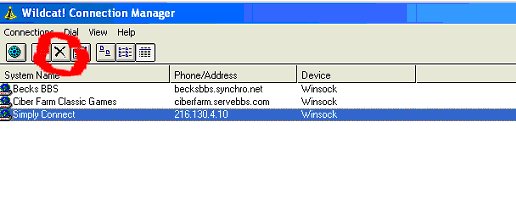
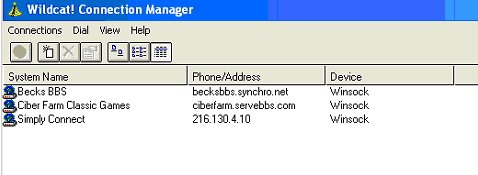
installed on your computer): 1. Go to your Start button, click on All Programs,
Select Wildcat Navigator, and then click on Wildcat Navigator to open it
up. It will look like this:
|
|
2. DELETE any of the old connections you no longer
need by highlighting them and clicking the DELETE button.
|
|
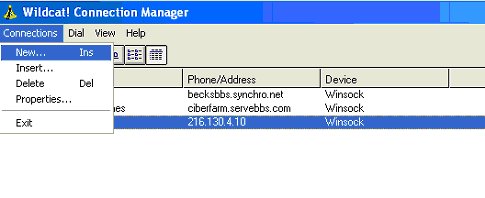
3. Now click the CONNECTIONS tab at the top and
Select New.
|
|
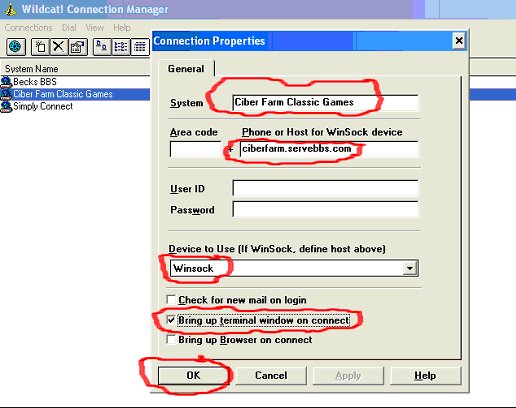
4. Now fill in the information as seen in the example
below. System: Ciber Farm Classic Games Phone or Host for Winsock device: ciberfarm.servebbs.com Device to Use (just click on arrow, scroll UP, then
select): Winsock Put a Check ONLY in the box: Bring up terminal
window on Connect Then Click OK to finish the setup.
|
|
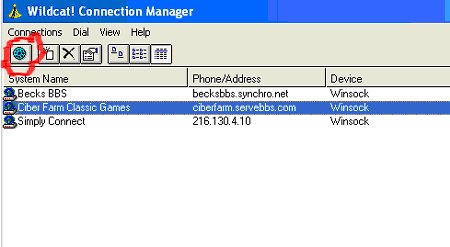
5. Congratulations, you are done with the Wildcat
Navigator setup. Now just select the newly created connection for Ciber
Farm Classic Games and click the Dial button.
|
|
|
| >>> |