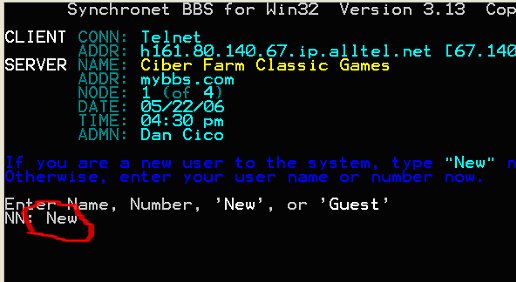
1. Type in: New
| >>> |
|
Ciber Farm Classic Games BBS |
| >>> |
|
>>"BECOME A REGISTERED USER" - SETUP INSTRUCTIONS |
| >>> |
|
INSTRUCTIONS FOR JUST USING YOUR WEB BROWSER to
access the BBS: This will automatically open up the Windows telnet
window. Click on the link below or
type into your address window of your browser the following: telnet://ciberfarm.servebbs.com Then proceed to the instructions below for:
INSTRUCTIONS TO SIGNUP (Register) ON THE BBS the first time you connect. |
|
|
|
INSTRUCTIONS FOR USING A SPECIAL TERMINAL CLIENT
(similar to a Java client or any other type of client you may have
installed on your computer) to
access the BBS: With this BBS software you will be able to run most
any terminal client. These terminal client will give your more options and
allow you to resize and make the viewing window larger. I would suggest
you consider using Wildcat Navigator for connecting to the games. The Wildcat
Navigator is better than the telnet software standard on Windows XP and it is still
FREE. You can
download and then install the Wildcat Navigator terminal client by clicking the link below (it is about a
4meg download): ftp://ftp.santronics.com/wildcat/wcnav/wcnav.EXE INSTRUCTIONS FOR SETTING UP WILDCAT NAVIGATOR to access the BBS (click here)
|
|
|
| INSTRUCTIONS TO SIGNUP (Register) ON THE BBS the first
time you connect. This may seem very complicated and lengthy but I assure
you even a novice can do this in a few minutes. If you have any
problems with the instructions, feel free to email me at dan@ciberfarm.com |
|
1. Type in: New |
|
2. All information will be kept “strictly private” on this
BBS. The information collected is for the minimal amount necessary to run
the database of the BBS software. We do NOT ask for mailing addresses or
phone numbers. Please answer the following questions: Do you have a color terminal?: Yes Does your terminal support IBM extended ASCII?: Yes Enter your full name or alias: PLEASE TYPE YOUR REAL
FIRST AND LAST NAME Enter your full real name: PLEASE TYPE YOUR REAL
FIRST AND LAST NAME Enter your city, state: PLEASE TYPE YOUR REAL CITY
AND STATE Network mail address: PLEASE TYPE YOUR REAL CURRENT EMAIL ADDRESS Is the above information correct?: YES (if the
above information is honestly correct) 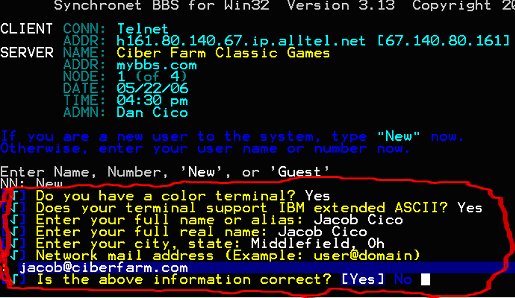 |
|
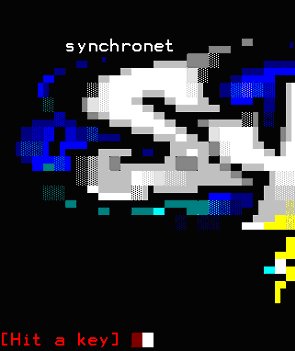
3. The next 4 screens are simply to be read by you
and then you can “Hit a Key” to go onto each next screen.
|
|
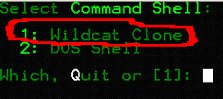
4. Command Shell is the format to be used to display
the BBS to you and how to access the different applications. I have chosen
only the Wildcat Clone as it is the easiest to navigate and looks the
best. Please select
“1” (Wildcat Clone) and hit Enter.
|
|
5. The BBS system will generate a random password for
you if you choose. If you want your own password: Hit Enter (you
will notice that anytime the response is automatically bracketed, like the
[Yes] is below, you simply need to hit enter).
|
|
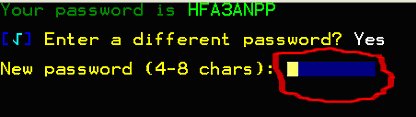
6. Enter your new (4-8 characters) password and
hit Enter. You can always change your password later when logged into the
system.
|
|
7. Enter your new (4-8 characters) password again
for system validation and hit Enter.
|
|
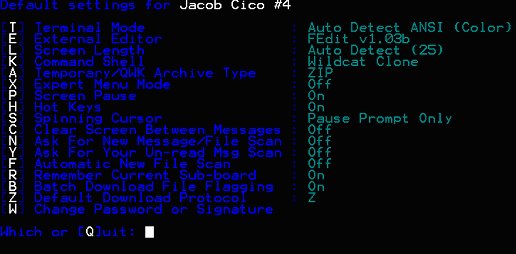
8. You can play around with your system settings on
this page “if you desire”. I would recommend that you can always do
that later. To go on simply: Hit Enter
|
|
9. Put anything you would like in here. Fill in
the answer and Hit Enter.
|
|
10. You are almost DONE. Hit Enter
|
|
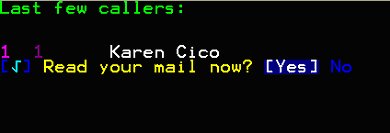
11.Type in either [Yes] or No and move on.
|
|
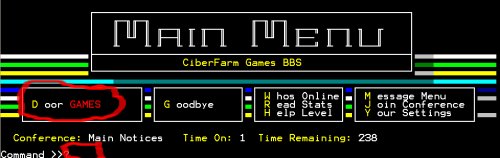
12. YOU MADE IT!! This is the Main Menu screen
of the BBS. By typing a “D” (for Door GAMES) at the Command line you
will proceed to the Games area. Once there just select a
number from the list and start PLAYING.
|
| >>> |
| If you have any problems with the instructions, feel free to email me at dan@ciberfarm.com |
| >>> |
|
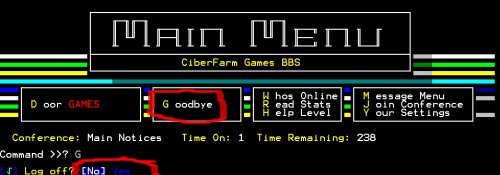
LASTLY, PLEASE REMEMBER TO PROPERLY “LOGOFF” WHEN FINISHED. This will free up the computer properly for others to play and have the maximum of the computer’s system resources. THANK YOU IN ADVANCE FOR DOING THIS!! To logoff just type a “G” (for Goodbye)
at the Command line and then choose Yes.
|
| >> |
|
End of setup instructions. |
|
|
| >>> |
| >>> |