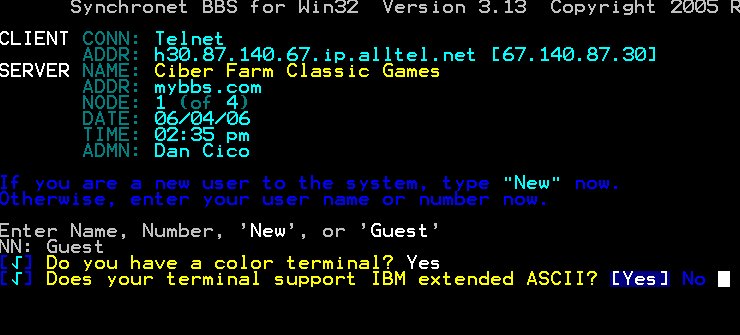
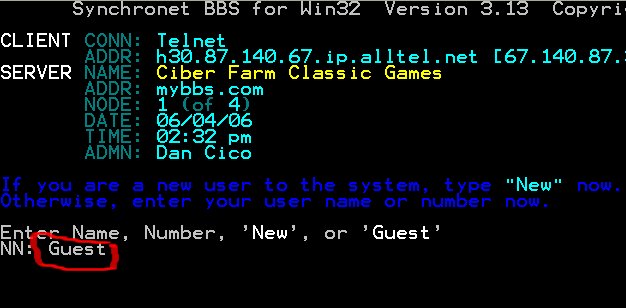
1. Type in: Guest
| >>> |
|
Ciber Farm Classic Games BBS |
| >>> |
|
>>"TRY" the games out as a GUEST - SETUP INSTRUCTIONS |
| >>> |
|
INSTRUCTIONS FOR JUST USING YOUR WEB BROWSER to
access the BBS: This will automatically open up the Windows telnet
window. Click on the link below or
type into your address window of your browser the following when you are
ready: telnet://ciberfarm.servebbs.com Then proceed below for:
INSTRUCTIONS TO LOGON TO THE BBS. |
|
|
|
INSTRUCTIONS TO LOGON TO THE BBS. If you have any
problems with the instructions, feel free to email me at dan@ciberfarm.com |
|
1. Type in: Guest |
|
2.
Please answer the following questions: Do you have a color terminal?: Yes Does your terminal support IBM extended ASCII?: Yes
|
|
2. All information will be kept “strictly private” on this
BBS. The information collected is for the minimal amount necessary to run
the database of the BBS software. We do NOT ask for mailing addresses or
phone numbers. Please answer the following questions: Enter your full name: PLEASE TYPE YOUR REAL
FIRST AND LAST NAME Enter your city, state: PLEASE TYPE YOUR REAL CITY
AND STATE Where did you hear about this BBS? FILL IN AN ANSWER AND HIT ENTER  |
|
3. You are almost DONE. Hit Enter
|
|
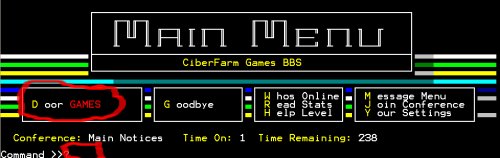
4. YOU MADE IT!! This is the Main Menu screen
of the BBS. By typing a “D” (for Door GAMES) at the Command line you
will proceed to the Games area. Once there just select a
number from the list and start PLAYING.
|
| >>> |
| If you have any problems with the instructions, feel free to email me at dan@ciberfarm.com |
| >>> |
|
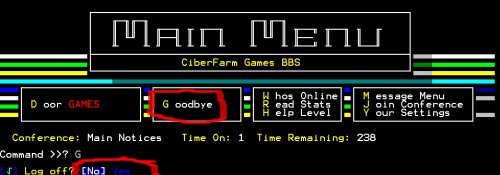
LASTLY, PLEASE REMEMBER TO PROPERLY “LOGOFF” WHEN FINISHED. This will free up the computer properly for others to play and have the maximum of the computer’s system resources. THANK YOU IN ADVANCE FOR DOING THIS!! To logoff just type a “G” (for Goodbye)
at the Command line and then choose Yes.
|
| >> |
|
End of setup instructions. |
|
|
| >>> |
| >>> |